Articles by "Tips & Tricks"
Showing posts with label Tips & Tricks. Show all posts

What is Crypto Trading?


Crypto trading, short for cryptocurrency trading, is the buying and selling of digital currencies on online platforms. Cryptocurrencies, such as Bitcoin and Ethereum, are decentralized digital assets that use cryptography to secure their transactions and to control the creation of new units.

Crypto trading is similar to traditional stock trading in that traders buy and sell assets in the hopes of making a profit. However, there are some key differences between traditional stock trading and crypto trading.

One of the main differenc Crypto trading, short for cryptocurrency trading, is the buying and selling of digital currencies on online platforms. Cryptocurrencies, such as Bitcoin and Ethereum, are decentralized digital assets that use cryptography to secure their transactions and to control the creation of new units.

es is that the crypto market is highly volatile and can experience significant price fluctuations in a short period of time. This can make it a risky investment, but it also presents opportunities for traders to make significant gains.

Another difference is that the crypto market is highly decentralized and operates 24/7, making it accessible to traders all over the world at any time. It also allows for a greater degree of anonymity, as traders can buy and sell digital currencies without revealing their personal information.

To start trading in cryptocurrency, a trader needs to set up an account on a crypto exchange platform like Binance, Coinbase, and Bitstamp. These platforms connect buyers and sellers and facilitate the trading process. Once the account is set up, the trader can deposit funds and start buying and selling digital currencies.

It is important to note that crypto trading is not for everyone. It requires a certain level of risk tolerance and a good understanding of the market and the technology behind it. It is also important to be aware of the risks and to conduct thorough research before making any trades.

In conclusion, crypto trading is the buying and selling of digital currencies on online platforms in the hopes of making a profit. It is a decentralized and highly volatile market that requires a good understanding of the market and the technology behind it. It is important to be aware of the risks and conduct thorough research before getting involved in crypto trading.


Crypto Trading in 2023


As we enter the year 2023, the world of crypto trading is continuing to evolve and mature. While the market remains highly volatile and presents significant risks, it also offers a wealth of opportunities for traders looking to make a profit.

One of the biggest trends in crypto trading in 2023 is the increasing institutionalization of the market. More and more traditional financial institutions are entering the space, offering their clients access to the crypto market through investment products like ETFs and mutual funds. This is bringing a greater level of stability and credibility to the market, making it more appealing to a wider range of investors.

Another trend in crypto trading in 2023 is the growing popularity of decentralized finance (DeFi) platforms. DeFi platforms allow individuals to access a wide range of financial services, such as lending and borrowing, without the need for a centralized intermediary. These platforms are built on blockchain technology and are becoming increasingly popular as they offer a greater degree of transparency and security.

The use of automated trading strategies, known as bots, is also on the rise in 2023. These bots use advanced algorithms to analyze market data and make trades on behalf of the trader. This can be a useful tool for traders looking to make quick trades based on market conditions, but it also has the potential to be risky if not used properly.

It's also worth noting that government regulations on crypto trading have been increasing in many countries. While some countries have outright banned it, others have implemented strict regulations to prevent money laundering and other financial crimes. This is something to keep in mind when trading, as it can affect your ability to trade and access certain platforms.

In conclusion, crypto trading in 2023 is a highly dynamic and fast-paced market that presents a wealth of opportunities for traders. The increasing institutionalization of the market, the growing popularity of DeFi platforms and the use of automated trading strategies are some of the key trends to watch out for. However, it's important to keep in mind the risks and stay informed about the regulations in your country before getting involved in trading.


 Application Telegram, which became the biggest competitor of WhatsApp in 2021, has released more new and interesting features on the last day of the year.

Telegram has introduced iMessage style reactions as well as other very useful features like hide text and message translation to give its users a New Year's gift.


  • Message Reaction

This feature will allow users to respond to any message with the help of emojis. This feature has already been added to iPhone's iMessages, Facebook Messenger and Instagram.

Telegram is the first messaging application to include animated and interactive emojis in messaging. Telegram today added some of these emojis to the Reaction feature so that it's users can share their emotions and feedback with a message.

These telegram reactions can be used in individual, group and channels.Although, on channels and groups, the admin will have the option to decide which reactions to allow and which not.


  • Spoiler

Telegram's spoiler feature allows users to set new 'spoiler' settings by selecting any part of their message while typing.

Selecting the spoiler option will hide your selected part of the chat.


  • Message Translation

The translation feature is very important for messaging appls. Fortunately, Telegram has become the first messaging app to include this feature in its app.

This feature allows the user to translate any message into another language.

To enable the feature, go to the app's settings and then select 'Language'. When you select a message, a new 'Translate' button will be added to the text box.

 This feature supports all Android devices, but Apple devices will need to update to iOS 15 or higher operating system. The list of languages   available for translation depends on your phone's operating system.

A new feature related to WhatsApp desktop will be introduced soon


The social media messaging app WhatsApp is working on a new feature that will allow druggies to change privacy settings from desktop. 

 According to WhatsApp Beta Info, a new feature is being worked on and this point will be available in unborn updates of the WhatsApp Desktop Beta. 

 From the desktop version, users can only manage notification settings, theme changes, chat wallpapers and block connections. Privacy settings can only be changed through the mobile app. 

 After the new update, users can change other privacy settings, including profile pics and about you.You'll also be given the option to open and close the"Blue Tick" icon for viewing messages transferred on the WhatsApp, as well as the option to add to the group. 

The option to manage blocked connections will also be moved to this new section of Privacy Settings. 

 WhatsApp has not yet blazoned a release date for the new feature, but it'll be available on beta testers first. 


How to Disable Windows 10 Update


Windows 10 is the most used operating system for personal computers. The world's largest software developer was launched by Microsoft in Windows 10, 2015. Since 2015, there has been a number of major changes in Microsoft's Windows 10, which has led to a significant improvement in its performance. However, in Windows 10, the Windows Update feature features most consumers.


Before Windows 10 introduced Microsoft's version of Windows, it was available in the Options Control Panel to close or modify the Windows Update features, from where users used to set their desired settings.
However, no option was given to close or enable Windows updates in the Windows 10 control panel. Today we will tell users the closest way to turn off and reactivate the Windows Update feature in Windows 10. First, you turn your computer on, then press Windows Logo + R together. Now you will open a box of run command in front of you.
Enter here by writing services.msc.

Now a Windows window will open before you. Here you'll see the details of the Windows Services Services service. If you press here, you'll be able to list the service that starts with W. Go to the list below, you will see an option called Windows Update.


Double-click this option. Here you will see an option as a Startup State. The option should be enabled or Disabled before this option. If the service is enabled and you want to turn off Windows updates, disable it. And if you have Windows updates turned off and you want to activate it then enable it by disabled.
After that, the option of service status will be at the bottom of the option, stop it if the service is started. Then click Apply below and then click OK.

Features of Windows Updates have been closed. After that, you must restart your computer once again. It is also clear that it is necessary to make all the changes that are logged in with the account that you are logged in with. You must have Administrative Rights, otherwise, you are described above. Changes will not be made.

The Windows Update feature should always be enabled to keep any computer safe. However, because this feature is working at the background all over the time and is also conserving the Internet, so the computers whose low diminishes and the processor's speed is low, the difference between their work is obvious. They become lazy.

10 Tips for using your mobile phone in a minimalist way


Here are some tips for using your mobile phone in a way that makes life easier and more interesting. Warning: your friends, family, and acquaintances will make fun of you, treat you like a weirdo and even sometimes they will be angry with you for not fulfilling your expectations. Take it with humor and do not worry: they'll end up getting used to it ... 😉


1. Download only the necessary applications There are most unlikely applications. Before downloading any application, ask yourself: «Do I need it?» If you only consult Facebook once a day, maybe you can see it from your home computer, for example. And if you ask for more ... do you really need to consult it so much?


2. Do not download games.  Surely you find something more interesting to do than kill piglets with chickens. Give it imagination.


3. Disable all notifications of the applications. All mobile phones allow this to be done. I only receive SMS notifications or missed calls. This avoids distractions and saves battery.


4. It belongs to the minimum of groups of WhatsApp, Telegram or any other instant messaging application. In most groups, nothing relevant is said and important information can be found by other means. Be educated @: notify before leaving a group.


5. Do not respond to each text message at the moment you receive it. Give yourself some time to answer. If it is hard for you, start by setting two or three moments a day to check the messages. When you no longer need to consult continuously if you have a new message, you will not need a schedule. Do the same with email and even with phone calls.


6. Forbidden to use the mobile phone when you are in the middle of a conversation with another person or in a meeting with people, and less to answer a text message. Remember that your actions indicate how much you value these other people, more than your words. I think it's disrespectful to do this, and it really bothers me when they do it with me. If you have no choice (urgent call, directions for something immediate ...) apologize.


7.Whenever you can answer a text message with a phone call. Text messages can be very efficient. You can communicate with someone who is not available right now and they can read your message later, or send an email if they have to go home. But once a text conversation reaches more than 3 texts, all efficiency has been lost. It could have been handled more easily with a simple phone call.


8.For important conversations, call or stay in person. Conversations based on your relationships, important business, or bad news can lead to confusion if done through text. These types of conversations should always be dealt with through the telephone or, better yet, in person.


9. Turn it off when you're doing something, and focus on what you're doing, whether it's eating, driving, walking or being with your children. Do not miss your life by being aware of the mobile phone.


10. Do not carry your mobile phone always on top. There are times in life that are too important to be distracted from by a text message. For example, I rarely carry my smartphone when I go to the park with my children. My responsibility to give them my full attention is more important to me than any incoming call or text message. Or even spend some time without a mobile phone. Take the test for a day, a week or even a month. How you feel? Are you missing something? Do you have anxiety? Disconnect for a while. The world is full of real sensations.

8 tips for Android smartphones that you totally ignored


Smartphones are small technological marvels. There are, however, many features that most users do not know and can be very useful in everyday life!

Here are the ones we found for Android phones.


There is a boat mode


Like the airplane mode that everyone knows, there is a boat mode available on all phones. To activate it, just hold a few seconds his finger on the plane mode icon to see one of the boat modes. This mode allows thanks to the WiFi waves to spot nearby submarines and of course to resist the water.

...


Emergency numbers


You may have noticed that when your phone is locked, you can only call emergency numbers. Few people know it, but besides the fire department and the EMS, you can call any restaurant that delivers pizzas. The founders of Google Larry Page and Sergey Brin being two huge fans of Italian food, they ranked pizza delivery as a vital need. Even if one has lost his PIN code, even with a stolen phone, the man is entitled to order a pizza.

...

Google Past


In its last update, Google has added to its famous feature Google Now an option that allows you to switch to Google Past, a service a bit similar but offers only news at all. For example, you can see the weather from 2 weeks ago and say "damn it, if I had known, I would have put on a sweater! Or you can relive history by reading about Lady Di's death.


Charge your smartphone in 2 minutes


Are you in a hurry and you only have 1% of the battery? Do not panic! There is a quick and easy way to fully charge your phone. Simply :

  • put your phone in a microwave (without the shell, and it is not compatible with the iPhone),
  • put the meter on 2 minutes,
  • wait ... and you're done!
This trick, however, has nothing magic: it is explained by the synchronization of the frequencies of the waves of the microwave and those of the electric waves emitted by the phone which results in charging of the battery.


Play Super NES version of Mario on any Android smartphone

Do you feel nostalgic? Do you have some time to kill during your subway trip?

Hold Power + Volume Down: At first, the phone will take a screenshot, but if you hold this position for more than 17 minutes, you will unlock the Super NES version of Mario on your phone.

So, do you have the stamina to activate this hidden feature?


Not OK Google

Do you need comfort? Does something grieve you? No problem. Just say "Not OK Google" followed by your complaint and the beautiful voice of synthesis will comfort you.

For example:-Not OK Google, I bought an apple and it was not good.

Your phone will surely answer you: "Do not worry, I'm going to dereference this bakery from my search engine and it will make this baker's badger less so! And anyway, you are very handsome and very intelligent, so you have no reason to go wrong. Long live technology.

 
...

Google Car


Have you heard about Google's free-standing cars and how are you dreaming? Well, good news: know that this dream is at hand. Just install the Google Car app from the Play Store, then connect your phone to the car radio via Bluetooth. Here! You now have the automatic driving option.

Warning: as the app is still in beta, it is necessary to manage some details: pedals, steering wheel and think about looking at the road, but other than that, it's 100% autonomy!

...

Scrub two Android phones together


This tip is not used much but it will still laugh your friends.

If you rub two Android phones against each other, their NFC system will understand it and unlock a video in which we see the little Android robot copulating with another little robot! If that's not cute ... then I do not know what it is.

Get Free Comments and Likes for Instagram - Boost


Friends you can get free Instagram likes and comments with this app. Its name is Leetgram.
This app is amazing. You just have to download the app from the link given below and you can get unlimited Likes and you can choose your Favourite comments and get them quickly.


Best Android Voice Recorder App 2019


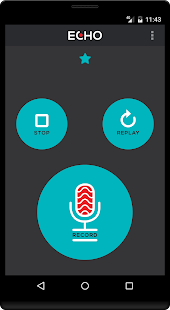
Echo is a simple sound recorder with quick playback. Presently with elective resound voice impact. To make a recording basically keep up the reported catch, discharge it and focus it performed to bring down back.

When you have made a recording you may play it returned as tons as you might want. Hit replay while an account is as of now betting and it will be played again ridiculous. You can likewise report while playing or play even as a chronicle. Sonic turmoil is ensured.


Echo's currently not only for a giggle, but it is also intended to be the fastest and least complex way to hear your self. It is a reflection for sound: use it to practice speak mean abroad dialect, voice tutoring, playing music, or giving a discourse. Or on the other hand, essentially have a chuckle recording your buddies.

Wonderful of all, Echo is totally advertisement free, so you can utilize it without diversion.

It would be ideal if you watch:

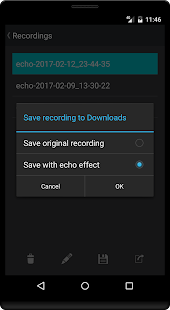
* you could now shop remotely - that is accessible from the Recordings show screen which you could access through the menu. (To store an account to this presentation screen, just spigot the blue whiz on the apex of the showcase subsequent to making the recording.)

* Recordings are put away as uncompressed sound - this demonstrates they've amazing sound fine, anyway the reports can be colossal. (Actually, Echo records sixteen pieces, forty-four.1 KHz PCM mono sound - putting away 1 moment of sound uses 5.29MB.)

* Sharing of remotely put away archives is plausible (e.G. By utilizing joining to electronic mail, informing applications, etc) - we will incorporate sharing quickly from the application soon.


Top 3 best WhatsApp Tips & Tricks 2019


Tag individuals in WhatsApp messages 
It's currently conceivable to tag different individuals from a WhatsApp group message so as to stand out enough to be noticed regardless of whether they have quieted the discussion. To tell any individual from a gathering message that you're attempting to stand out enough to be noticed basically type @ and select them from the rundown that shows up. 

Format Text in WhatsApp messages 
After numerous long periods of plain content help, WhatsApp has at last taken off designing help, empowering WhatsApp-ers to include intense, emphasized and strikethrough organizing choices to their messages. 
When clients are running version 2.12.535 on Android and 2.12.17 on iOS, it's genuinely simple to do. Basically, open a visit and adhere to these directions: 
Bold: Add reference bullets to either side of the content (*bold*) 
Italics: Add underscores to either side of the content (_italics_) 
Strikethrough: Add tildes either side of the content (~tilde~)

Mute a WhatsApp Group Chat
It has been five or so years since you left Uni, and your mates thought it'd be a smart thought to make a group chat with (what feels like) 15 million individuals always sending messages. We've all been there, isn't that so? Fortunately, you can quiet the mindless prattle for eight hours, a week or even a year on the off chance that you have no plans to participate with the 'talk'. 
It's a genuinely simple activity to, just open the irritating group chat, tap the name of the visit at the highest point of the application, tap 'Mute' and select the term of the Mute.


Top 5 best Photo Editor Apps 


1.PICSART


With over 500million downloads PicsArt is one of the most loved photograph altering applications out there. The reason PicsArt is such an emerge is because of the sheer number of alternatives you have for redoing your photographs. It accompanies an inherent camera include and an informal community for sharing photographs.

Different highlights incorporate composition, draw, edges, stickers and the sky is the limit from there. The app is accessible for nothing with some in-application buys, however, you need to manage promotions.


2.POWER DIRECTOR


PhotoDirector is a kind of multi-reason photograph supervisor application. It has an a la mode and easy to use interface where you can rapidly alter hues and tone of your pictures with its straightforward, yet integral assets. The app has an in-application camera highlight where you can apply live photograph impacts as you snap your photographs. You can alter photos and offer them rapidly on Facebook and the sky is the limit from there.


Also, PhotoDirector gives you the administration to evacuate an undesirable individual or article from your photograph with its speedy Content-Aware Removal altering devices. It is allowed to download with some in-application buys and contains advertisements.


3.SNAPSEED


Snapseed is certainly among the best photograph editorial manager applications. Google purchased this a couple of years back. The application has developed into a significant incredible photograph proofreader in this space. It has bolster for RAW photographs which will satisfy picture takers incredibly.  It's misleadingly light and straightforward for how incredible it is. The application is additionally one of the uncommon free photograph supervisor applications without any promotions or in-application buys. This is the one we'd suggest first, trailed by the Adobe applications and after that everything else.


4.Adobe Lightroom CC


It is a powerful photo editor very useful for both beginner and advanced use


Provide powerful set of editing tools
easy and simple user interface
You can apply many filters with only one tap.
It include built-in camera app to capture RAW format images
You download Adobe Lightroom CC on the App store for free.


5.CANDY CAMERA


Cabdy Camera incorporates numerous channels and even stickers to enrich your photographs. Without restrictions it is conceivable, in addition to other things, to wipe out or cover up skin polluting influences straightforwardly on the picture. Notwithstanding standard channels, selfie channels supplement the officially vast choice. The impacts are cool, so that even photographs taken in the workplace or under an overcast sky look as if they were snapped underneath the sun. Several stickers round off the entire thing and make for more fun. Regardless, you should experiment with the application.